How Bold-Start Reader Converts a PDF or EPUB to Bionic-Style Reading — Without Uploading It
A look under the hood of Bold-Start Reader: how it parses a PDF, EPUB, or other document, applies bionic-style bolding, and re-packages the result into a new file, all inside a single browser tab with no server involved.
Most "upload your file, we'll convert it" tools work exactly as the name says: your file leaves your device, lands on someone else's server, gets processed, and comes back. Bold-Start Reader doesn't do that — a PDF or EPUB you open with it never leaves your browser tab. That's a claim worth being specific about rather than just asserting, so this post walks through what actually happens between dropping a file on the page and downloading the bionic-style result: how the file gets read, how the bolding is computed, and how the new file gets built — all three steps, in the browser, with no network request carrying your document anywhere.
What the output actually looks like
Bionic-style reading bolds the first part of every word, as a visual anchor some readers find easier to focus on:
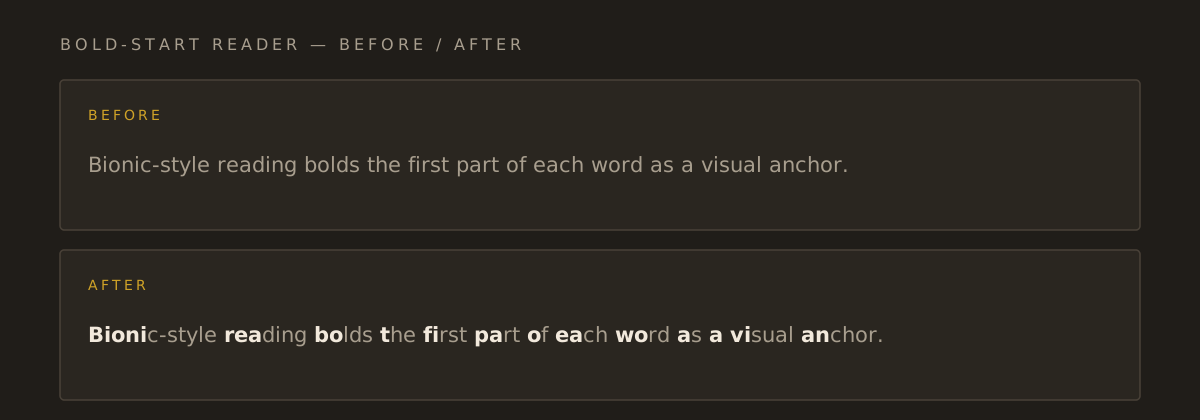
That's the whole visual idea. The interesting part — and the part worth a blog post — is getting from "a PDF someone handed you" to "an EPUB with that bolding baked in, and the original chapter structure intact," without a server anywhere in the loop.
The three-step pipeline
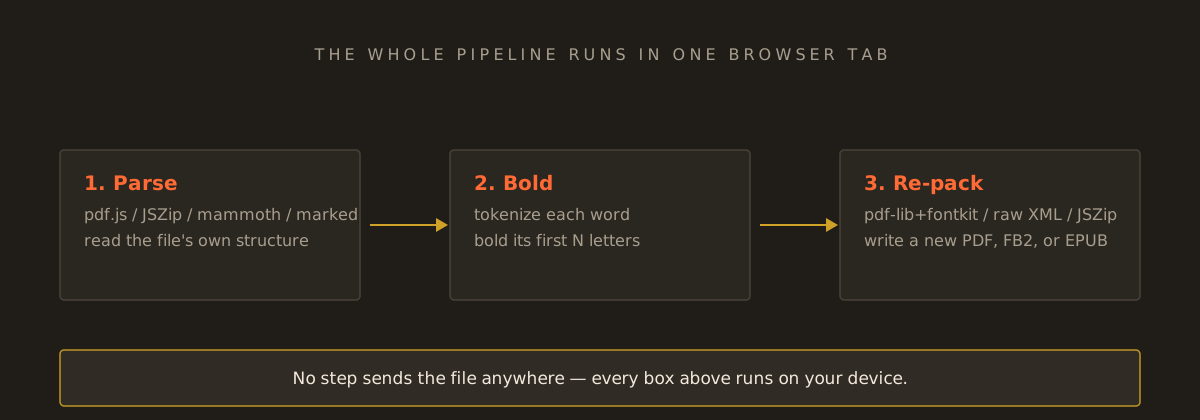
Each of those three boxes is a distinct piece of work, and each one matters for a different reason.
1. Parsing: every format gets read on its own terms
A PDF, an EPUB, and a DOCX file don't have anything in common structurally — they're entirely different container formats — so "extract the paragraphs" means something different for each one:
- PDF is read with pdf.js, the same engine Firefox uses to render PDFs natively. It doesn't give you paragraphs; it gives you individual positioned text fragments with x/y coordinates. The tool reconstructs lines by clustering fragments that share roughly the same vertical position, then reconstructs paragraphs by looking at the typical gap between lines on a page and treating an unusually large gap as a paragraph break. This runs one page at a time, with a progress indicator, so a 500-page book doesn't lock up the tab.
- EPUB is a zip file, unpacked in-browser with JSZip. Inside, a
container.xmlpoints at an OPF manifest, which lists every chapter file and the reading order (the "spine"). Each chapter is its own XHTML document, parsed as strict XHTML first (some EPUB-generating tools emit self-closing tags like<title/>that are valid XML but not valid HTML5 — an HTML parser misreads those and silently drops the rest of the document) and falls back to a lenient HTML parse if that fails. Chapter titles come from the EPUB's own table of contents (the NCX file, or the EPUB 3 nav document), so the structure in your reader matches the structure in the source file. - DOCX goes through mammoth, which turns the Word XML into HTML; Markdown goes through marked; FB2 is read directly as XML, since its paragraph and chapter tags are already explicit. Every path ends up at the same shape: a title, a flat list of paragraph strings, and — for EPUB and FB2 — a list of chapter marks pointing at where each chapter starts in that list.
None of this touches fetch or XMLHttpRequest. The file comes in through the browser's native File API (file.text() or file.arrayBuffer()), gets parsed with libraries that run entirely in JavaScript, and never has a reason to leave the page — there's no server-side step in this pipeline to send it to.
2. Bolding: a tokenizer and a ratio, nothing more exotic
Once there's a flat list of paragraphs, the bolding step is comparatively simple. Each paragraph is tokenized into words and the whitespace/punctuation between them. For each word, a ratio (0.2–0.6, with Light/Medium/Strong as presets at 0.3/0.4/0.5) decides how many of its leading letters get wrapped in a <b> — longer words get proportionally more bolded letters, and very short words get at least one, unless the "Skip short words" option is on, in which case short function words like "the" or "of" are left alone entirely, since bolding one letter of a three-letter word doesn't add much as a visual anchor.
This step produces the same output whether the text came from a PDF, an EPUB, or something you pasted directly — by the time bolding runs, the format the text originally came from is irrelevant. That separation (format-specific parsing feeding into one shared bolding function) is also why the in-page reading pane, the full-screen reader, and every exported file end up looking consistent: they all call the same function with the same ratio.
3. Re-packaging: three very different file formats, built from scratch
This is the step most "convert online" tools skip entirely by just handing you back a modified copy of what you uploaded — which Bold-Start Reader can't do, because there's no server-side copy to modify. Instead, each download format is built from the bolded paragraph list, client-side:
- PDF is assembled with pdf-lib and its
fontkitextension, which can embed a real font file directly into the generated PDF. The chosen font (Sans, Serif, or a high-legibility option) is fetched from the site's own static assets — not uploaded anywhere, just read locally — and embedded as both a regular and a bold weight, so the bionic bolding renders correctly in any PDF viewer without relying on that viewer having a particular font installed. Text is laid out word by word, measuring each segment's width against the embedded font's own metrics, wrapping lines manually. - EPUB is built the same way it was read, in reverse: a fresh
container.xml, an OPF manifest, a table of contents, and one XHTML file per chapter, all zipped back up with JSZip into a valid EPUB package. If the source file had chapter titles, the generated EPUB keeps them — one navigation entry per chapter, so the download opens in an e-reader with the same structure the original had. - FB2 is simpler still: it's just XML, so the output is built as an XML string directly, with
<section>elements for each chapter and<p>for each paragraph.
Every one of these happens in memory, in the tab, and ends with a Blob that gets turned into a downloadable file via URL.createObjectURL — a browser API for turning in-memory data into a download link, with nothing uploaded in between.
Why this is the harder way to build the feature — and why it's worth it
It would be meaningfully less code to upload the file to a server, run the exact same parsing and bolding logic with a mainstream PDF/EPUB library on the backend, and send back a result — server-side PDF and EPUB tooling is more mature than what's available in a browser, and none of the format-specific quirks above (strict-XHTML-then-lenient-HTML-fallback, reconstructing paragraphs from positioned PDF text fragments) would need solving twice. The reason it's not built that way is the actual promise being made: if a document is personal enough that bolding it for easier reading matters, it's personal enough that it shouldn't need to leave your device to do that. A browser tab that processes everything locally can make that promise literally, not just as a privacy-policy line — there's no upload step to audit or trust, because there isn't one.
What this approach can't do (yet)
Being honest about the trade-offs of running everything client-side: a scanned PDF with no selectable text layer can't be read this way — there's no OCR step, so a PDF of photographed pages produces an error, not an empty result pretending to have worked. Layout, images, tables, and footnotes aren't preserved; the output is reflowable text, which is a deliberate scope limit rather than an oversight — preserving a PDF's exact visual layout while also re-flowing it for a different font size is a different (and much harder) problem than what this tool is trying to solve. And the font choice described above currently only applies to the reading pane, the full-screen reader, and the PDF download — a downloaded EPUB or FB2 keeps its own default styling, since e-reader apps generally override document fonts with their own settings anyway.
If you want to see the pipeline above on your own file, Bold-Start Reader is free, and — per everything above — there's genuinely nothing to upload.
Tools used in this guide
Bold-Start Reader
Convert pasted text or a PDF, EPUB, FB2, DOCX, TXT, Markdown or HTML file to bionic-style reading (the start of each word in bold), then read it online or download it as PDF, EPUB or FB2 — in the browser, no upload; an independent tool, not the official Bionic Reading® app.